
← old cassettes and camcorder tapes, rescued
Converting Camcorder Tapes to Digital (the Format Maze, Solved)
Camcorder tapes are three different jobs: VHS-C plays in any VCR with a $15 adapter, Hi8 and MiniDV need their original camera or a service, and every transfer runs in real time at the tape's own resolution.
 Gus Harmon · Updated July 8, 2026 · how I decide
If you buy through my links the site earns a little. It's never why I pick things.
Camcorder tapes are three different problems wearing one nostalgia, so first figure out which tape you have. VHS-C is the happy path: a $15 adapter lets it play in any VCR, then a $20 capture stick pulls it into your computer. Hi8 and Video8 need the original camcorder (or a Digital8 deck) to play them. MiniDV needs its camera too, and its old connections are why services earn their money there. Whatever the format, transfers run in real time and come out at the tape's own resolution: faithful, not HD.
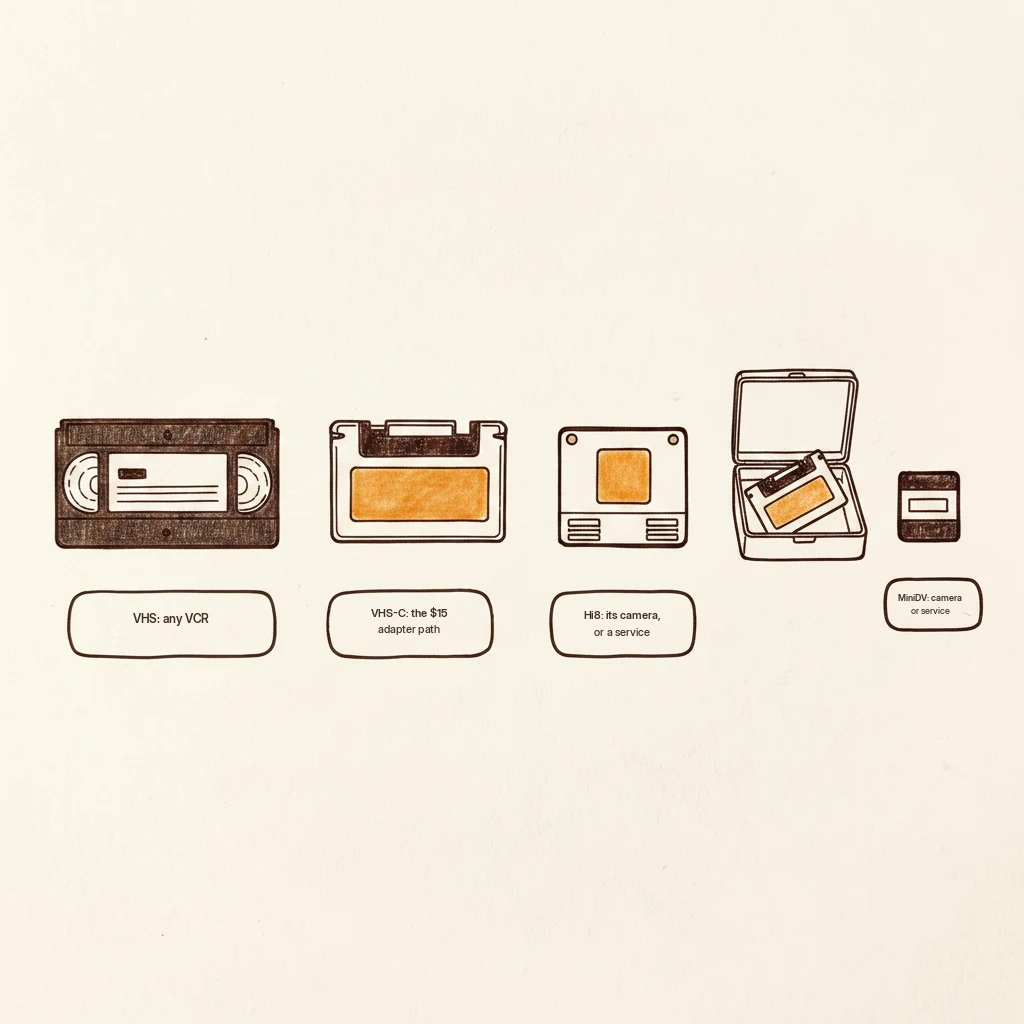
First, identify the tape in your hand
Here’s the thing nobody explains before selling you a gadget: “camcorder tape” isn’t one format. It’s four, and they don’t all convert the same way. Line them up by size.
A full-size VHS is the big one that goes straight into a VCR. A VHS-C is the palm-size cassette, same tape inside, just a smaller shell. A Hi8 or Video8 is the little metal-shelled one. A MiniDV is the tiny matchbox-size tape. Once you know which you’ve got, the path is simple.
VHS-C: the easy one, do this first
If your tapes are the palm-size VHS-C, you’re in luck. A mechanical adapter, about $15, holds the small tape inside a full-size VHS shell so it plays in any regular VCR. Then a USB video-capture stick (about $20) takes the VCR’s output and records it onto your computer.
That’s the whole DIY happy path. Adapter, a working VCR, a capture stick, and your Saturday.
Hi8 and Video8: the player is the whole problem
With the little metal tapes, the tape is fine. The bottleneck is that you need the camcorder that recorded them, and that camcorder often died back in 2009. There's no adapter trick here. Something has to physically play the tape.
Your options: dig out the original camcorder if it still runs, borrow one, or buy a working used one off a marketplace for roughly $50 to $100. That last one sounds wasteful until you do the math: buy it, transfer your whole box, then resell it the same month. Net cost, once you sell it on, is close to renting one for twenty bucks.
MiniDV: the one where a service actually makes sense
MiniDV needs its camera and the older cables that camera used, and those connections are fussy enough that for most normal people, mailing these tapes to a service is the sane answer. No shame in it. This is the format where paying somebody buys you real peace.
The capture box, and the resolution truth
For the DIY paths, the thing that grabs the video is a capture device. A name-brand one like the Elgato class runs about $80 to $90 and is reliable. Generic USB capture sticks are about $20 and are a bit of a quality lottery, so know that going in.
And here’s the honest part the upsell pages hide: your files come out at the tape’s own resolution, the soft, older look these cameras always had. Anybody promising to “convert to HD” is selling you sharpening, not real detail. The tape holds what it holds. A faithful copy is the honest goal.
One thing before you start: if the box came from a damp basement, check for mold first. A moldy tape can spread spores into your player and ruin the rest of the box.
Skip this unless you like the nerdy part. MiniDV is the odd one out because it was already digital. The camera recorded ones and zeros onto the tape, so a proper transfer isn't a re-recording at all, it's a file COPY straight off the tape with nothing lost. That's why MiniDV transfers, when you can manage the cables, come out looking the sharpest of the bunch. The others were analog, painting the picture as a smear of magnetism, so capturing them always means re-photographing an old painting.
Find the palm-size tapes first. The $15 adapter turns those back into regular VHS tonight. The little metal Hi8s wait for a $60 marketplace camcorder: buy it, transfer the box, resell it the same month. And the MiniDVs, honestly, mail them to a service.
Questions people actually ask
How do I convert VHS-C to digital at home?
Buy a VHS-C adapter (about $15). It’s a full-size cassette shell that holds the small tape so it plays in a normal VCR. Then connect a USB video-capture stick (about $20) between the VCR and your computer and record while it plays. That’s the whole job, in real time.
Can I convert camcorder tapes without the camcorder?
Sometimes. VHS-C can skip the camcorder entirely using an adapter and a VCR. But Hi8, Video8, and MiniDV all need a player that speaks their format, usually the original camera or a compatible deck. If yours is dead, borrow one, buy a used one to resell after, or use a service.
Will converting make my old videos look HD?
No, and be wary of anyone who says it will. The transfer is faithful to the tape’s original resolution, which was always fairly soft. “HD conversion” just sharpens or stretches the same picture. A clean, honest copy at the tape’s real quality is the best and truest result.
If you buy through my links the site earns a little coffee money. Doesn’t change the price, doesn’t change my answer.
Working through the box, you're probably also wondering:
Gus Harmon
Gus spent three decades running sound wherever somebody needed it: bar bands, weddings, school shows, and twelve years of Sunday mornings. He can't sing a note. He can make sure you're heard. Now he writes so normal people can buy the right thing the first time.